Installing LangPy as a Progressive Web App
Step-by-step guide to add LangPy to your home screen or desktop. Save system resources, reduce battery usage, and learn programming logic offline.
Key Advantages of Installing LangPy
LangPy can be installed directly onto your device as a Progressive Web App (PWA), eliminating the need to navigate via a traditional web browser for every session.
This provides a dedicated workspace, faster boot times, and full offline functionality—allowing uninterrupted logic practice in low-connectivity or offline environments.
Installation Instructions by Platform
Desktop (Linux, Windows, and macOS)
- Open LangPy using a modern WebKit or Chromium-based browser such as Brave, Google Chrome, or Microsoft Edge.
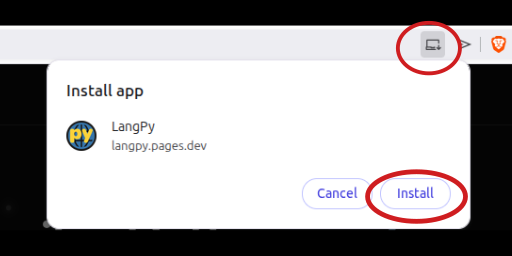
- Locate the installation prompt or computer icon in the right corner of the address bar.
- Click "Install" and confirm the installation in the browser modal.
Android Devices (Smartphones & Tablets)
- Open LangPy in Brave or Google Chrome on your mobile device.
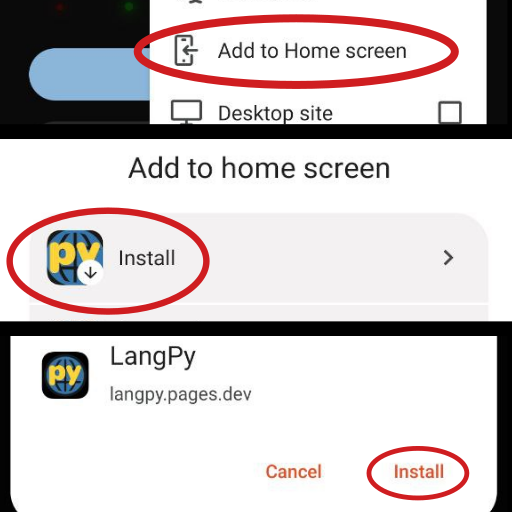
- Tap the install banner that appears at the bottom of the viewport.
- If the banner does not appear, open the browser context menu (three dots) and select "Install App" or "Add to Home screen".
iOS Devices (iPhone and iPad)
- Open LangPy exclusively using the Safari browser.
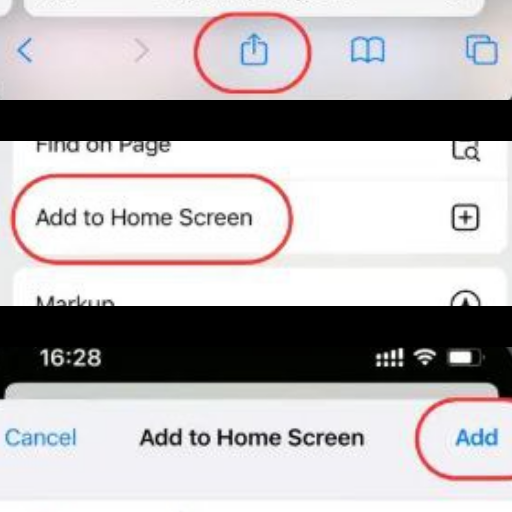
- Tap the "Share" icon (square with an upward arrow) on the navigation bar.
- Scroll down the action menu and select "Add to Home Screen".
Launching the Application
Once installed, LangPy behaves as a standalone native application with its own launch icon.
Access it directly from your desktop, application drawer, or mobile home screen without opening a browser frame.
Offline Runtime & Local Storage
The execution runtime and core interactive tools are cached locally on your device storage, enabling standalone operation offline.
The application requires an initial active internet connection once to cache essential runtime assets and interactive modules.
External hyperlinks to third-party services, repositories, or external resources will still require network access.
Automated Asset Syncing & Updates
No manual updates are needed. The Service Worker background process checks for new versions whenever a active connection is detected.
Restarting or reopening the PWA instance automatically applies newly downloaded application builds.
Removing the Application
- Windows / macOS: Use system settings, or open the PWA window menu (three dots in title bar) and select Un-install.
- Android: Long-press the LangPy app icon and drag it to "Uninstall" or choose the uninstall option from the context pop-up.
- iOS: Touch and hold the LangPy icon on the home screen, then tap "Delete App".
Troubleshooting & Common Issues
Install button or menu prompt is missing
You may be navigating through an embedded web view (such as an in-app browser within social media platforms).
Open your device's native browser (Chrome, Safari, Edge, or Brave) directly and navigate to the application URL.
Application fails to load offline content
The offline cache storage process was interrupted before completion.
Connect briefly to the internet, open the application once to complete the Service Worker caching lifecycle, and then resume offline usage.