Install LangPy as an App
Guide to install LangPy as an application on different devices and take advantage of all its benefits. For better performance and resource usage.
What is LangPy?
LangPy is a web application that can be installed as a Progressive Web App (PWA), allowing you to use it as if it were a native application.
This gives you faster access, a dedicated window, and the ability to use it even offline for certain functions.
Install LangPy
On Linux, Windows and macOS
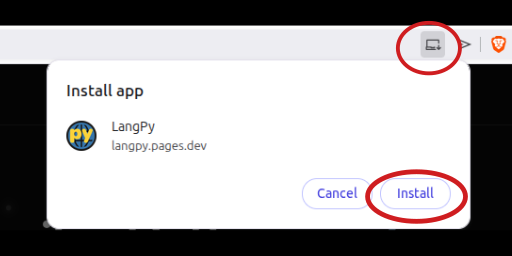
- Open LangPy in Brave, Google Chrome or Microsoft Edge.
- Look for the install icon in the address bar.
- Click "Install" and confirm.
On Android
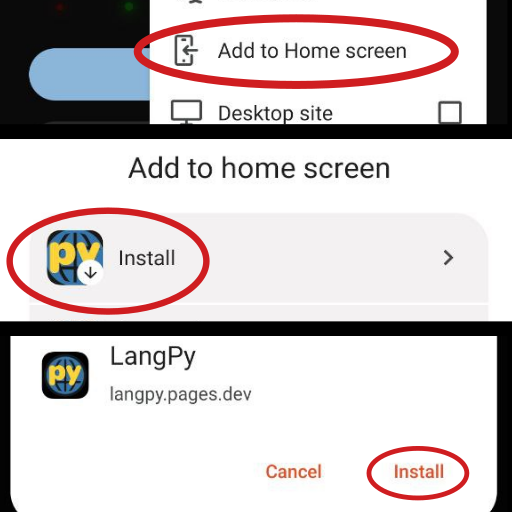
- Open LangPy in Brave or Chrome for Android.
- A banner or installation option will appear in the menu.
- Tap "Add to home screen".
On iOS (iPhone and iPad)
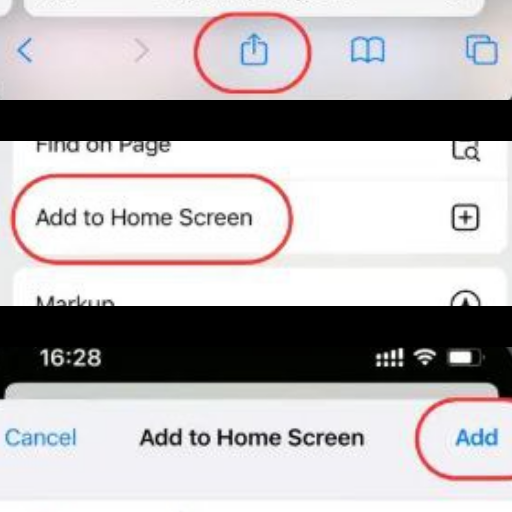
- Open LangPy in Safari.
- Tap the share button.
- Select "Add to Home Screen".
Open LangPy
Once installed, LangPy behaves like a standalone application.
You can open it from the applications menu, desktop, or home screen of your device.
Use LangPy Offline
LangPy can continue working offline for certain tasks, as long as it has been previously opened with internet access. "Stellar Code Mission" will be downloaded by default.
The content available offline depends on the functions you have used before.
Some advanced features may require an internet connection.
Update LangPy
LangPy updates automatically when a new version is available.
Usually it is enough to close and reopen the application to receive the changes.
Uninstall LangPy
- On Windows or macOS: uninstall LangPy like any other application.
- On Android: long press the icon and select uninstall.
- On iOS: long press the icon and tap "Remove App".
Common Problems
The option to install LangPy does not appear
The browser is not compatible or does not meet installation requirements.
Use an updated browser like Brave, Chrome, Edge or Safari and reload LangPy.
The course does not work offline
The offline content has not been downloaded to the device yet.
Open LangPy with an internet connection. Run any course lesson al least once while online to ensure it will work correctly offline.